How to make a shot list (with a template)
A shot list turns a script into the setups you will actually film. How to build one from beats, which columns it needs, and a template to copy.
A script says what the viewer should hear and feel. It does not say where the camera stands. That gap gets filled either on paper the evening before, or on location while the light moves and the battery drains. A shot list fills it on paper.
What follows is the method, independent of any tool: where shots come from, what to write down for each, how to number them, and how to check the list before the shoot.
What a shot list is, and what it is not
A shot list is one row per camera setup, in the order the shots appear in the cut. Each row says what the frame shows and how it is framed, plus anything you would otherwise have to remember on the day.
It is not:
- a script. The script is the words and the meaning. The shot list is the pictures that carry them. One sentence of narration can sit over three shots; one shot can run under a whole paragraph.
- a storyboard. A storyboard draws the frame. A shot list describes it. You can have one without the other, and for most solo YouTube work the list alone is enough.
- a shooting schedule. The list is in cut order. The day is shot in a different order, by light and location. That is a separate step, covered in How to plan a solo shoot day.
Start from beats, not from the script text
The common way to make a shot list is to read the script line by line and invent a picture for each sentence. It produces lists that illustrate the words and miss the point: every line gets a shot, and no shot does a job.
Work one level up instead. Split the script into beats, the stretches that each do one thing to the viewer: hook them, state the problem, turn it, pay it off. For each beat, write its job in one sentence. Then ask which shots do that job.
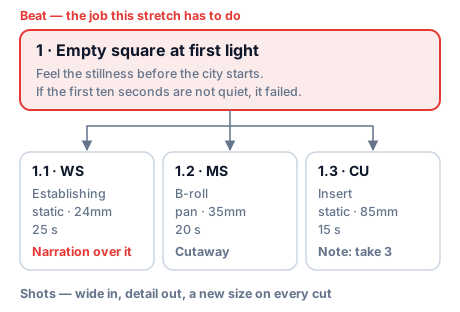
Beat: Empty square at first light. Job: the viewer should feel the stillness before the city starts. If the first ten seconds are not quiet, the beat has failed.
With the job written down, the shots almost suggest themselves: something wide and static to establish the stillness, something with slow movement to hold it, one small detail that breaks it. Without the job you get "nice shot of the square" three times.
The columns
Start with the minimum. Add columns only when you find yourself writing the same note in the description over and over.
Minimum: the list you can shoot from
| Column | What goes in it |
|---|---|
| No. | Beat number and shot number: 1.1, 1.2, 2.1 |
| Description | What the frame shows, in one line someone else could set up from |
| Size | Wide, medium, close (abbreviations below) |
| Narration | The line that plays over this shot, or empty for a cutaway |
| Est. (s) | How long the shot runs in the cut |
Extended: when the day gets complicated
| Column | Why you would add it |
|---|---|
| Type | Establishing, B-roll, insert, talking head, POV: tells you how the shot is used in the cut |
| Move | Static, pan, tilt, gimbal, handheld, drone: sets the gear and the time to set up |
| Lens | You pack and plan lens changes from this column |
| Location | Needed as soon as one beat spans two places |
| On-screen text | Titles and labels, so the frame leaves room for them |
| Notes | Anything that will not survive in memory until the day |
| Status | Planned, shot, needs a retake |
The Notes column ends up being the most valuable one. It is where "take-off in frame only on take 3, use that one" or "motion blur too heavy at 1/50, reshoot at 1/100" goes, which is exactly what you will not remember three weeks later in the edit.
Shot sizes, briefly
| Short | Name | What it is for |
|---|---|---|
| EWS | Extreme wide | Place and scale; the subject is small or absent |
| WS | Wide | The whole space and what is in it |
| FS | Full | A person head to toe, or an object whole |
| MS | Medium | Waist up; most explaining happens here |
| MCU | Medium close-up | Chest up; the default talking head |
| CU | Close-up | A face or an object filling the frame |
| BCU / ECU | Big / extreme close-up | A detail: eyes, hands, a texture |
You do not need every size in every beat. You do need to change size from one shot to the next: two consecutive shots of the same size and angle read as a jump, not a cut. The full scale, the camera angles and how to choose between them are in Camera shot types: shot sizes and angles explained.
Numbering that survives changes
Number shots by beat: beat.shot. The second shot of beat three is 3.2.
When you insert a shot between 3.2 and 3.3 after the list is done, call it 3.2A. Do not renumber. Shot numbers end up in file names, on slates, in notes and in messages ("3.3 needs a retake"). Renumbering after any of that exists breaks every reference to the old number.
Coverage: how many shots per beat
There is no right count, but there is a usual shape:
- one shot that can open the beat, usually the wide, so the editor has a way in;
- one or two that carry it: the medium or the move where the job actually happens;
- one detail, the insert or close-up that gives the editor somewhere to cut to.
Narration needs one more thing: enough pictures to sit under it. A 20-second line over a single 5-second shot leaves the editor with a hole. Check this with the Est. column: the shots under a line should add up to at least the time the line takes to say. How to estimate that time is in Words to minutes: how long will your script run?.
Shot list example: two beats from a city film
City Sketch is an eight-minute portrait of a city across one day, shot on one camera with primes and no artificial light. These are its first two beats, from the demo studio in CoTube.
Beat 1, Empty square at first light. Job: stillness before the city starts.
| No. | Description | Size | Type · move | Lens | Narration | Est. | Notes |
|---|---|---|---|---|---|---|---|
| 1.1 | Wide on the empty square, camera on sticks under the arcade, square filling the frame edge to edge | WS | Establishing · static | 24mm | "The city is still asleep. Give it ten minutes and it will not be." | 25 s | Title "CITY SKETCH" over it |
| 1.2 | Mid on the dry fountain basin, slow pan left to right | MS | B-roll · pan | 35mm | 20 s | ||
| 1.3 | Close on a pigeon on the kerb, taking off through frame | CU | Insert · static | 85mm | 15 s | Take-off in frame only on take 3; use that one |
Beat 2, Commuters at the crossing. Job: carry the film from stillness into rush without the cut reading as a jump. It has to stay the same morning.
| No. | Description | Size | Type · move | Lens | Narration | Est. | Notes |
|---|---|---|---|---|---|---|---|
| 2.1 | High angle from the far kerb, one full light cycle in a single take | FS | Establishing · static | 24mm | "…and now a thousand feet are already going somewhere." | 20 s | |
| 2.2 | Walking with the crowd, camera at shoulder height | MS | Over the shoulder · gimbal | 35mm | 15 s | ||
| 2.3 | Low and static, only legs crossing the white bars | CU | Insert · static | 50mm | 10 s | Motion blur too heavy at 1/50; reshoot at 1/100 |
Three things to notice:
-
Each beat opens wide and closes on a detail. The editor can enter and leave every beat cleanly, and the size changes on every cut.
-
Narration sits on the first shot only. The line is short and the shots after it run as cutaways under the ambience. That is the film's brief: sparse voice, the rest carried by sound.
-
The notes are what saved the edit. The pigeon shot worked once in three takes. The feet shot needs a retake at a faster shutter. Neither fact belongs in the description, and both would have been lost without a column for them.
Template
Copy into a spreadsheet, one row per shot. Fill No., Description, Size and Narration first; the rest can wait until the list settles.
| No. | Description | Size | Type | Move | Lens | Location | Narration | On-screen text | Est. (s) | Notes | Status |
|---|---|---|---|---|---|---|---|---|---|---|---|
| 1.1 | Planned | ||||||||||
| 1.2 | Planned | ||||||||||
| 1.3 | Planned | ||||||||||
| 2.1 | Planned |
Check the list before the shoot
Read it once more against the script, with these questions:
- Does every beat have a shot that can open it? If a beat starts on a close-up, the editor needs something wider from the beat before.
- Does every line of narration have enough picture under it? Add the estimates of the shots it runs over.
- Do two neighbouring shots share a size and angle? Change one of them.
- Is there a shot nobody can describe in one line? Then it is not decided yet. Decide it now, not on location.
- Does the total of Est. match the planned runtime? If it is twice the plan, the cut will be painful. Drop shots now.
Common questions
What is a shot list for?
A shot list decides on paper what you will film, so nothing has to be invented on location. It turns each beat of the script into concrete camera setups, tells you what to bring, and gives the editor enough coverage to cut. On the day, it doubles as a checklist of what is still missing.
Is it shot list or shoot list?
Shot list. It lists shots, the camera setups that end up in the cut, and that is the term used on film sets and in production software. "Shoot list" is an informal variant you will hear sometimes, usually meaning the same thing.
How do you make a shot list from a script?
Split the script into beats first, write the job of each beat in one sentence, then list the shots that do that job, one row per camera setup. Reading the script line by line and illustrating each sentence gives you many shots and no structure. The full method is above, in Start from beats, not from the script text.
Can I see a shot list example?
Yes: the example above shows two beats of a real project, with sizes, lenses, narration, timing and the notes that saved the edit. The full project is open in the CoTube demo.
In CoTube
A project splits into beats, which carry the job and the planned time, and shots under each beat, which carry size, type, move, lens, narration and notes. The script is read as a view over the shots in order, so the shot list and the script are the same data, never two copies. On the day, shooting mode walks through the shots and logs takes with notes. The structure is explained in the guide: Beats, scenes and shots. The City Sketch project above is in the demo, no sign-up needed.